Undo for Postgres, without losing the rest of your day
pgVolvra puts back the exact rows a mistake changed, and leaves everything else alone.
Postgres gives you no way to take back a single statement. When someone runs an UPDATE without its WHERE clause, recovery is a procedure rather than a command. You restore a copy of the database to the moment before the mistake, pull out the rows that were damaged, and reconcile them by hand against a live table that has kept moving since.
This kind of recovery works, and teams do it. It also takes hours, needs your most senior person, and every step is a chance to make things worse while the table is still serving traffic. One second of bad SQL turns into an afternoon of careful work by the people you can least afford to tie up.
Oracle users have Flashback for exactly this case, and it is really two features: one to read the past, one to put it back. Postgres has neither. Point in time recovery is what makes that procedure possible, but it recovers an entire cluster rather than a statement. You restore it alongside production and compare, because rewinding production itself would discard everything that happened after the mistake. I wanted something smaller and more precise, so I built pgVolvra.
What pgVolvra Does
pgVolvra records every row change on the tables you choose. For each change, it keeps the row as it was, and the row as it became, along with who made the change, when, and in which transaction. When something goes wrong, it uses that record to put the affected rows back, and it touches nothing else.
The whole engine is plain SQL and PL/pgSQL. There is no compiled extension, no shared_preload_libraries, no superuser, and no access to the server's filesystem. That was a design constraint from the first day, and it is the reason the tool runs on managed Postgres at all.
Setting It Up
Installation is running one file against your database. It works from psql, from any SQL client, or from a provider's web console.
psql "$DATABASE_URL" -f sql/volvra.sqlThen you pick the tables you want covered. pgVolvra records nothing until you do this, and it cannot recover anything that happened before, so this step is the one that matters.
SELECT volvra.enable('public.orders');That is the entire setup. From this point every INSERT, UPDATE and DELETE on orders is recorded.
A Working Example
Here is the full sequence on a table you can create yourself. I will make the same mistake on purpose and then walk back out of it.
1. Create a table and enable pgVolvra. A primary key is required, because that is how pgVolvra finds a row again later.
CREATE TABLE orders (
  id       bigint PRIMARY KEY,
  customer text NOT NULL,
  status   text NOT NULL,
  total    numeric(10,2)
);

INSERT INTO orders VALUES
  (1, 'ayesha', 'shipped', 240.00),
  (2, 'omar',   'pending', 99.50),
  (3, 'lena',   'shipped', 18.75);

SELECT volvra.enable('public.orders');
2. Make the mistake. The WHERE clause is missing, so every row is hit instead of one.
UPDATE orders SET status = 'cancelled';
UPDATE 3
3. Look at what happened to one row. volvra.history takes the table and the primary key as jsonb, and shows every version of that row.
SELECT ts, actor, op, old_row -> 'status' AS was,
       new_row -> 'status' AS now
FROM   volvra.history('public.orders', '{"id": 1}');

         ts          | actor | op |    was    |     now
---------------------+-------+----+-----------+-------------
 2026-09-16 11:04:19 | api   | U  | "shipped" | "cancelled"
4. Preview the undo. This call writes nothing. It builds the exact plan and hands it back so you can read it before anything changes.
SELECT * FROM volvra.preview_undo(
         target  => 'public.orders',
         from_ts => now() - interval '5 min');
5. Query pgVolvra. Without confirm => true the function refuses and changes nothing, which has saved me more than once while testing.
SELECT * FROM volvra.undo(
         target  => 'public.orders',
         from_ts => now() - interval '5 min',
         confirm => true);
The three orders go back to what they were. If a customer had really cancelled an order during those five minutes, that cancellation would still stand, because pgVolvra reverses recorded changes rather than restoring a snapshot over the table.
Time Travel, and an Early Warning
Undo is what you reach for once you know what went wrong. Two things sit earlier than that.
The first is reading the past without touching it. volvra.as_of rebuilds a covered table as it stood at any moment, and writes nothing at all:
SELECT * FROM volvra.as_of('public.orders', '2026-09-16 15:39');This is what you actually want first. Before deciding whether to undo anything, you want to see what the table looked like and compare it against what is there now. Rows deleted since that moment come back, rows created since then are absent, and the live table is untouched. It is the read-only half of Flashback, and it is safe to run while you are still working out what happened.
The second is being told at 15:40 instead of 16:10. pgVolvra can warn when one statement changes more rows than you expect:
SELECT volvra.set_warn_changed_rows(1000);

UPDATE orders SET status = 'cancelled';
WARNING:  volvra: one statement changed more than 1000 row(s) of public.orders
That is the whole feature. It does not block anything, and it does not slow the statement down enough to matter. It says something out loud at the moment a missing WHERE clause runs, rather than leaving you to find out when a customer calls.
The warning is off by default, and off means the triggers are not attached at all, so a database that does not use it carries none of the cost.
Describing the Problem the Way You Actually Describe It
A time window is the blunt option. Most of the time you know something more specific about what went wrong, and pgVolvra lets you say it directly.
volvra.undo_txid(...) reverses one transaction across every table it touches. This is the migration you regret.
actor and db_user reverse the work of one application identity or one database role. This is the import job that went wrong while everything else kept running normally.
volvra.mark('before-deploy') names a moment, and volvra.undo_to('before-deploy') returns to it.
predicate narrows an undo to rows matching a condition, and tables covers several tables in one plan.
pgVolvra records two identities for every change, not one. There is the database role, and there is an application level actor your connection sets. On a system where a dozen services share a single Postgres login, the role by itself tells you nothing useful.
The Safety Rules
An undo is a write, and a careless one does more damage than the original mistake. This is the part I spent the most time on.
Think about a mistake made at 15:40 and noticed at 16:10. During that half hour, real users changed some of the same rows on purpose. Blindly writing the old values back would destroy their work while repairing yours.
So pgVolvra checks each row before touching it. If a row no longer holds the value it had at the time, that row has moved on, and the whole operation stops and tells you which rows are in the way. You can pass skip_conflicts to fix the rest and leave those rows alone. You cannot ask it to overwrite them. There is no force flag, and I left it out on purpose, because a force flag always gets used eventually and always on the worst day.
There is also a limit on how many rows one operation may touch. If your filter matches far more than you expected, it stops instead of proceeding.
Where the History Lives
By default pgVolvra keeps the history inside your own database, in an ordinary table. That is simple, it needs nothing extra, and it is all most people ever use. It also means the history shares the fate of the database. Lose the database and the history goes with it.
So there is a second option. A small companion process runs outside the database, reads each change as Postgres commits it, and writes it to storage you own as newline delimited JSON with a manifest of SHA-256 hashes. Those files can be read without pgVolvra and without Postgres.
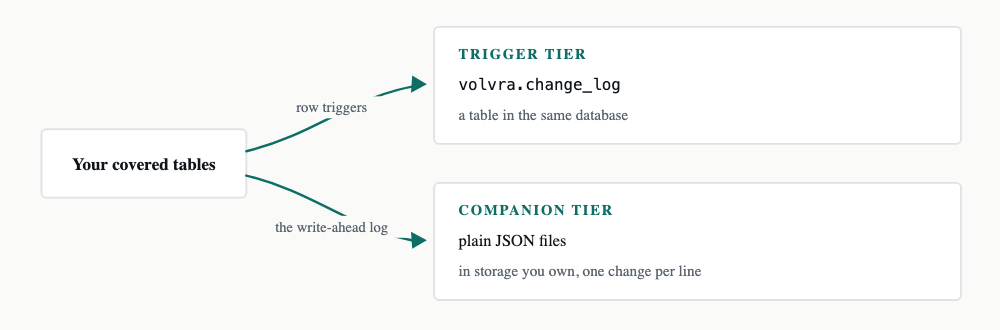
Neither tier needs the other. They watch the same tables and write to different places, and you can run either one on its own.
Starting the companion takes one command. It creates the replication slot if it is missing, resumes from the last segment already in the archive, and streams continuously.
volvra-companion run --dsn "$DATABASE_URL" --archive /srv/volvra-archiveRecovering the Hours After a Restore
Once the history lives outside the database, something else becomes possible, and this is the feature I am most pleased with.
Sometimes the database itself is gone and a backup is the only way back. Your backup is from 02:00, it is now 15:40, and the restore hands you a correct database that is missing almost fourteen hours of work. pgVolvra can read the changes it archived after 02:00 and apply them again on top of what the restore gave you.
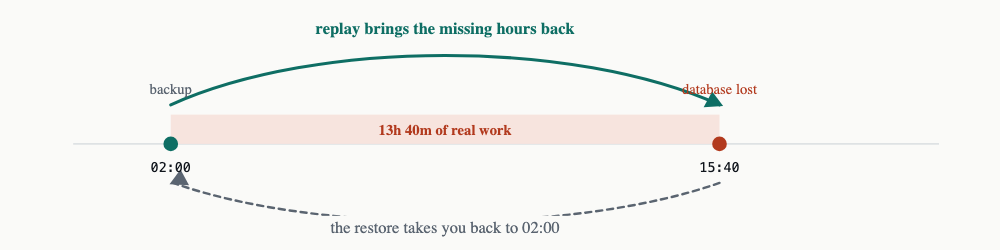
The restore moves you back in time. Replay moves the archived history forward again, on top of what the restore gave you.
Replay uses the same machinery as undo, pointed the other way. Same plan builder, same conflict checks, same row limit, same single transaction. I did not want a second code path for something this dangerous.
I also did not want to ship this on my word alone, so the test does the real thing. It takes a genuine pg_dump, writes more data on top, runs a genuine DROP DATABASE, restores the backup, restores the archive, replays, and then hashes every row of every covered table on both sides. The recovered database comes out identical to the one that was lost, on Postgres 14 through 19. Replaying a second time changes nothing further.
Running It on Managed Postgres
This is the part I care about most, because it is where the design constraint pays off. Most Postgres today is rented, and rented Postgres will not let you install an extension, will not make you a superuser, and will not let you near the server's filesystem.
pgVolvra needs none of those. Rather than claim compatibility from a datasheet, I ran the same 24 check verification against live instances on each provider.
Supabase and Neon both pass on their free plans. Supabase needed no configuration at all, because it already runs wal_level as logical for its own realtime feature and its postgres role can create a replication slot. On Neon you enable logical replication once in the console, and that change cannot be undone for the project, so verify the undo side first and turn it on only if you want the archive. On pgEdge Starfleet everything works except slot creation, which needs one ALTER ROLE admin REPLICATION from an administrator.
Amazon RDS, Aurora and Google Cloud SQL should work on the same basis, but the verification has not been run there yet, so they are not claimed here.
What It Costs
Writing history is not free, so here are the numbers rather than a claim that the overhead is minimal.
Write throughput drops by 11 to 41 percent depending on the statement. Narrow UPDATE is the worst case. Simple INSERT is the cheapest at 11 to 12 percent.
Each recorded change costs roughly 300 to 400 bytes.
Write-ahead log volume goes up by about 2.2 times.
Updates that change nothing are detected and skipped, and by default only the columns that actually changed are stored.
This is why covering every table is the wrong instinct. Cover the ones where losing data would genuinely hurt, and leave the rest alone.
What pgVolvra Does Not Do
It is not a backup, and it does not replace one. Keep your backups.
It only knows about changes made after you cover a table. It cannot recover anything from before that moment.
Replay restores rows. It does not replay schema changes, sequences, or tables you never covered, and it is not point in time recovery.
A table without a primary key cannot be covered, because that is how pgVolvra finds the row again later. A unique index is not accepted in its place.
Key Takeaways
Fixing one bad statement today means restoring a copy and reconciling rows by hand, under pressure. pgVolvra reverses only the rows the mistake touched, in one statement.
pgVolvra installs as one SQL file with no extension and no superuser, so it runs on managed Postgres. I verified it on Supabase, Neon and pgEdge Starfleet rather than assuming.
Undo refuses to overwrite rows that changed after the mistake, and there is deliberately no way to force it.
With the companion archive, history outlives the database, and replay can carry a restored backup forward over the hours the restore lost.
Setup is the whole job. Cover a table today and the tool is useful the day you need it, not before.
pgVolvra 1.0.0-beta2 is out now. It supports Postgres 14 through 19, it is open source under the PostgreSQL License, and the code, documentation and test suite are all at github.com/pgEdge/pgvolvra. It is a beta, and reports of where it breaks are genuinely welcome, as are questions, on the repository.


