PG Phriday: Against the WAL
Plenty of Postgres services end up managed by application developers, whether they like it or not. Some dabble in databases on the side, and some inherited the job when the last DBA scampered off for greener pastures. Regardless, they’re put in charge of something they barely understand. Heck, that literally happened to me twice. Sometimes there never was a DBA. Sometimes, it's just you.
I recently got a timely reminder of this when chatting with a colleague. Usually when it comes to Postgres, disk emergencies get traced back to the pg_wal directory. For an amateur or novice DBA, the first reaction might be to purge its contents in any way possible. What is all this WAL junk, anyway? It's just for crash recovery or something, right? The logs say the archive command is failing, so I can just set archive_command to /bin/true and it'll flush all that out. Easy peasy.
Oh how we all wish it were that simple. WAL is the single linchpin that keeps Postgres operational at all. It's the Durability in the ACID acronym commonly associated with relational databases. In Postgres, literally every write must pass through the WAL. But why would an app dev know that? Why would anyone aside from a seasoned DBA need to know it at all?
Fortunately the reality of the situation is actually incredibly easy to convey. I always like to start with something pretty much everyone has: a bank account.
Balancing the Books
A bank ledger starts with an opening balance. After that comes every deposit and every withdrawal, one line at a time, in the same order they happened. The balance printed at the bottom of a statement is a convenient aggregate summary. It's derived from the ledger, and any auditor can validate it by running the sum themselves.
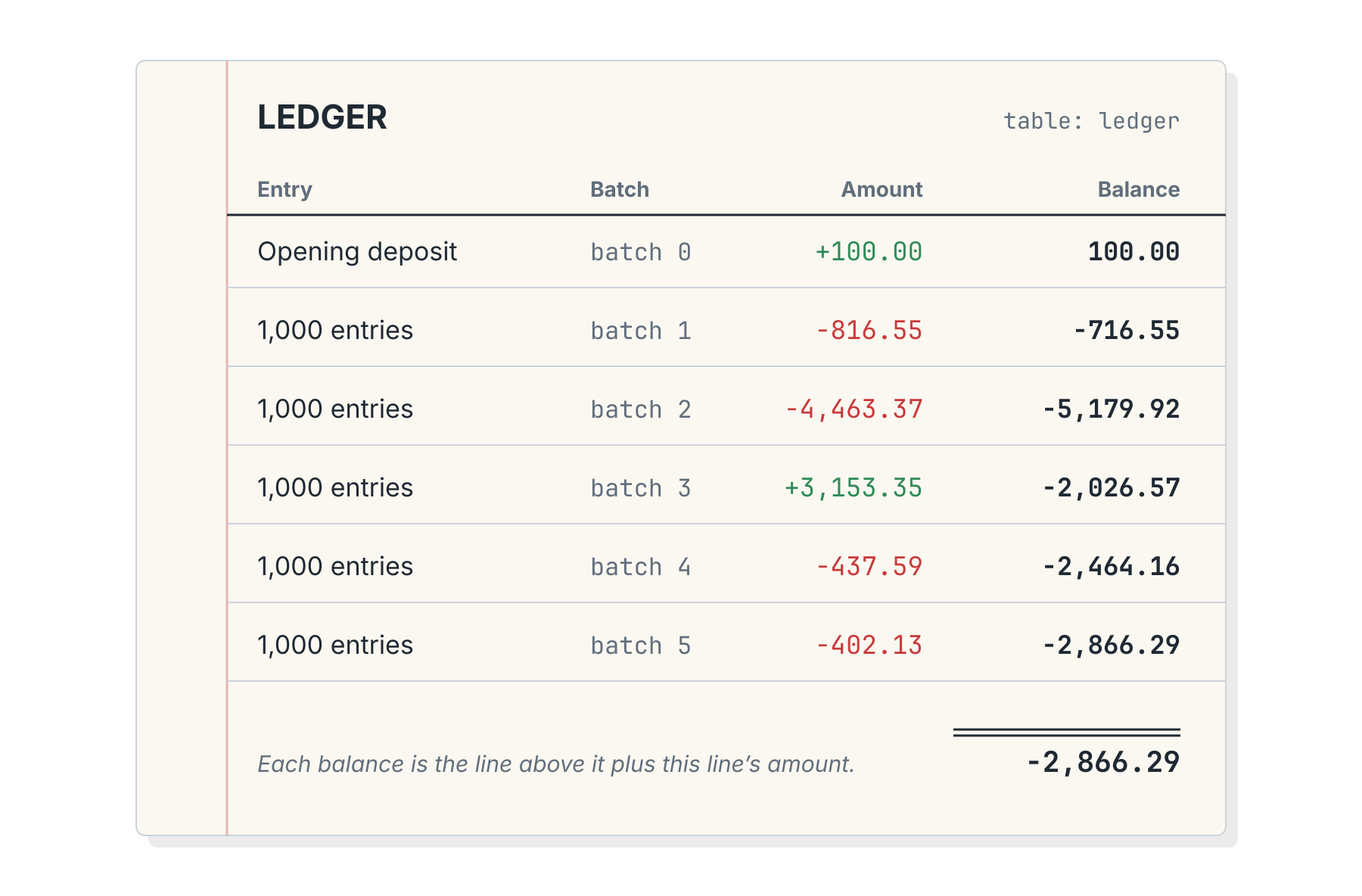 Now tear one page out of the middle of the ledger. Would you trust anything that came after? Even assuming the final total somehow survived because it was calculated earlier, who can say whether or not it's true now?
Postgres works the same way. The data files holding tables and indexes are the balance, and the WAL is the ledger. See? Easy.
What Is This WAL Thing?
WAL stands for Write-Ahead Log. As for what it is, the Postgres documentation puts it like this:
Briefly, WAL's central concept is that changes to data files (where tables and indexes reside) must be written only after those changes have been logged, that is, after WAL records describing the changes have been flushed to permanent storage.
So every change hits the log first, and the table files catch up later. If the server crashes before that happens, Postgres can just replay the log until it does.
Each entry has an address called a Log Sequence Number, or LSN. It's a byte position in one ever-growing log, so think of it as the ledger's line number. Each record points back at its predecessor, and the pg_walinspect extension will happily list them.
Physically, the log is cut into 16MB files called segments, with ever-increasing names like 000000010000000000000002. Those are the ledger's pages.
People have been tearing those pages out for a long time. Postgres 10 renamed the directory from pg_xlog to pg_wal, and the release notes explain why:
Users have occasionally thought that these directories contained only inessential log files, and proceeded to remove write-ahead log files or transaction status files manually, causing irrecoverable data loss. These name changes are intended to discourage such errors in future.
I... may have been guilty of this myself in the past. In my defense, putting "log" in a directory name is essentially begging uninformed users to do horrible things to it. Besides that, there's obviously some mechanism preventing the WAL directory from growing forever since it's not possible to keep a running ledger of every transaction for eternity.
What's cleaning up the WAL folder, and perhaps just as importantly, why?
Selective Amnesia
Postgres reconciles the books by processing checkpoints. After a checkpoint completes, table files contain everything written to the WAL by that point, so crash recovery only needs WAL from the last checkpoint forward. I covered how and when checkpoints happen in Checkpoints, Write Storms, and You.
It may be easier to see this in a live environment. Here's some output from a brand new instance:
SELECT pg_current_wal_lsn() AS lsn_before,
       pg_walfile_name(pg_current_wal_lsn()) AS segment_file;

 lsn_before |       segment_file
------------+--------------------------
 0/203A9F0  | 000000010000000000000002

-- Create some WAL traffic through table writes
CREATE TABLE scratch AS SELECT g AS id, repeat('x', 200) AS pad
  FROM generate_series(1, 300000) g;

SELECT pg_current_wal_lsn() AS lsn_after,
       pg_walfile_name(pg_current_wal_lsn()) AS segment_file;

 lsn_after |       segment_file
-----------+--------------------------
 0/6C89470 | 000000010000000000000006
And we can see these files in the pg_wal directory itself:
$> ls /var/lib/postgresql/18/docker/pg_wal

000000010000000000000001
000000010000000000000002
000000010000000000000003
000000010000000000000004
000000010000000000000005
000000010000000000000006
Then after running a CHECKPOINT command:
$> ls /var/lib/postgresql/18/docker/pg_wal

000000010000000000000006
000000010000000000000007
000000010000000000000008
000000010000000000000009
00000001000000000000000A
00000001000000000000000B
Where did the other files go? The log of the checkpoint has a few hints:
2026-10-05 21:36:00.273 UTC [85] LOG:  checkpoint complete:
   wrote 2169 buffers (13.2%), wrote 3 SLRU buffers;
   0 WAL file(s) added, 0 removed, 5 recycled;
   write=0.037 s, sync=0.075 s, total=0.131 s; sync files=69,
   longest=0.056 s, average=0.002 s; distance=78373 kB,
   estimate=78373 kB; lsn=0/6C894C8, redo lsn=0/6C89470
And as we saw, segments 1-5 were all "recycled". This essentially means Postgres renamed the file for reuse as a new segment. The entire cycle looks something like this:
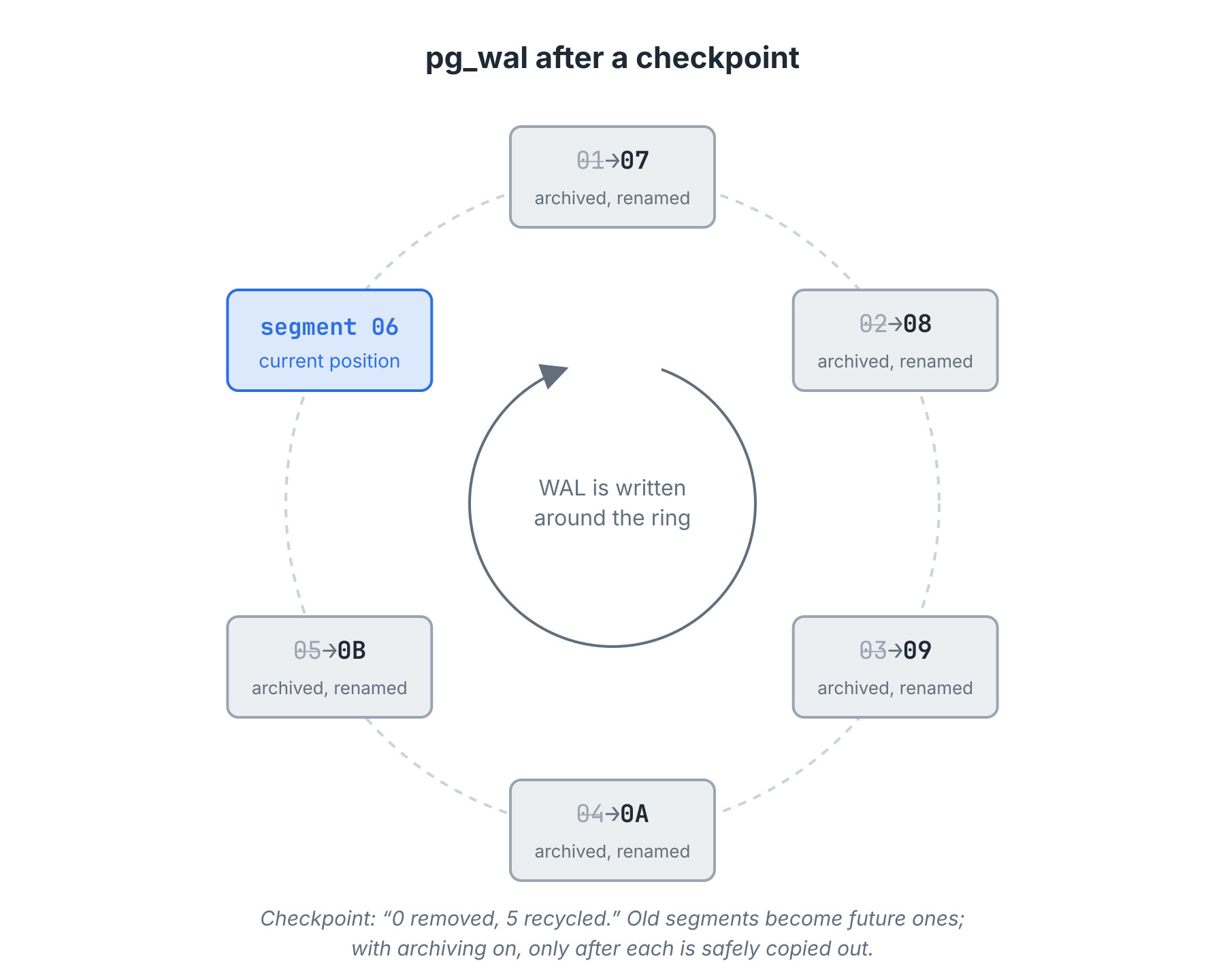 There is one notable exception here. With archiving enabled by activating
 archive_mode, Postgres won't recycle WAL segments immediately. Instead, it executes a provided archive_command that should move the segment to a safe location. Once archived, Postgres is free to recycle or delete the WAL segment. It's a careful dance meant to guarantee each WAL file is saved for later.
But why save old WAL segments if they're no longer necessary for crash recovery?
Look at this Photograph
Database backups still need old WAL files. Tools like pg_basebackup copy the data directory file by file while the server keeps running. Since writes continue during the copy, the files copied early and the files copied late reflect different moments. Any backup that requires more than a few minutes will reflect thousands of different file timestamps smeared across one "snapshot."
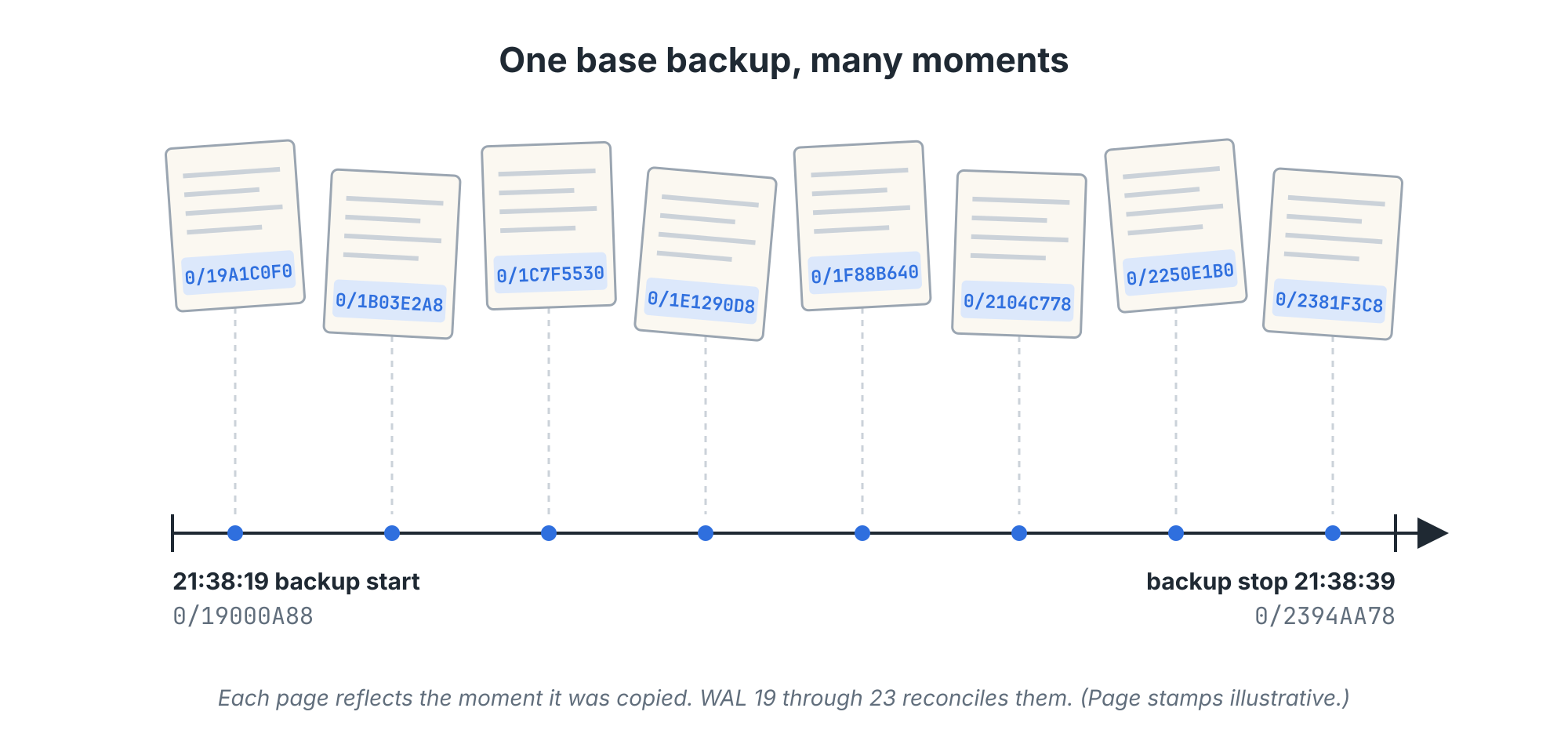 The documentation on continuous archival doesn't express much concern about this:
We do not need a perfectly consistent file system backup as the starting point. Any internal inconsistency in the backup will be corrected by log replay (this is not significantly different from what happens during crash recovery).
That replay needs WAL, though. Every WAL file generated over the entire duration of the backup, in fact. Attempting to start a Postgres service pointed to a backup without these WAL files will result in an error like this:
FATAL: could not locate required checkpoint record at 0/19616C10Postgres needs the pages in these WAL segments to update table and index files. Without them, the database is a long exposure photograph pointed at a busy intersection. There's no beginning or end, but a blurry mess of activity nobody can decipher.
That's not a database. Even a backup's validity depends on the ledger.
Rewind and Replay
Once the minimum WAL files are applied such that the backup itself is valid, we may continue replaying segments from the archive if we want. Replaying WAL over a backup rolls it forward through time, like tracking through a video. Stopping that replay early is point-in-time recovery, or PITR. The documentation has a memorable example:
If you want to recover to some previous point in time (say, right before the junior DBA dropped your main transaction table), just specify the required stopping point.
That stopping point is a recovery target: a timestamp (recovery_target_time), an LSN (recovery_target_lsn), or a named restore point created with pg_create_restore_point() (recovery_target_name).
To have something to rewind, I built a lab table named (what else?) ledger with an opening deposit as batch 0. Then I added five batches of 1000 random entries. Each batch got a restore point and a forced segment switch, since Postgres only archives completed segments. Like so:
INSERT INTO ledger (batch, amount, note)
SELECT 1, round((random()*200 - 100)::numeric, 2), 'batch 1'
  FROM generate_series(1, 1000);

SELECT pg_create_restore_point('after_batch_1');
SELECT pg_switch_wal();
Then we just need three settings in postgresql.auto.conf and an empty recovery.signal file in the data directory to restore:
restore_command = 'cp /var/lib/postgresql/archive/%f %p'
recovery_target_name = 'after_batch_5'
recovery_target_action = 'promote'
That particular restore came back with all 5001 entries and a balance of -2866.29, matching the primary to the penny. Then I swapped recovery_target_name for a recovery_target_time to specify a moment between batches 3 and 4 and tried again. That produced a restore that logged recovery stopping before commit of transaction 772 to contain only batches 0 through 3. (This kind of repeated backup restore is messy, so I'll spare you the details.)
In the end, we can see that WAL segments are a crucial and indispensable resource for backup restores. Without WAL segments, there's no such thing as a backup at all.
One Missing Page
To better illustrate this, perhaps it would make sense to see what happens when a segment gets lost. Replay is strictly sequential. Thus segment 0F can only be applied after 0E. The PITR docs put it this way:
To recover successfully using continuous archiving (also called “online backup” by many database vendors), you need a continuous sequence of archived WAL files that extends back at least as far as the start time of your backup.
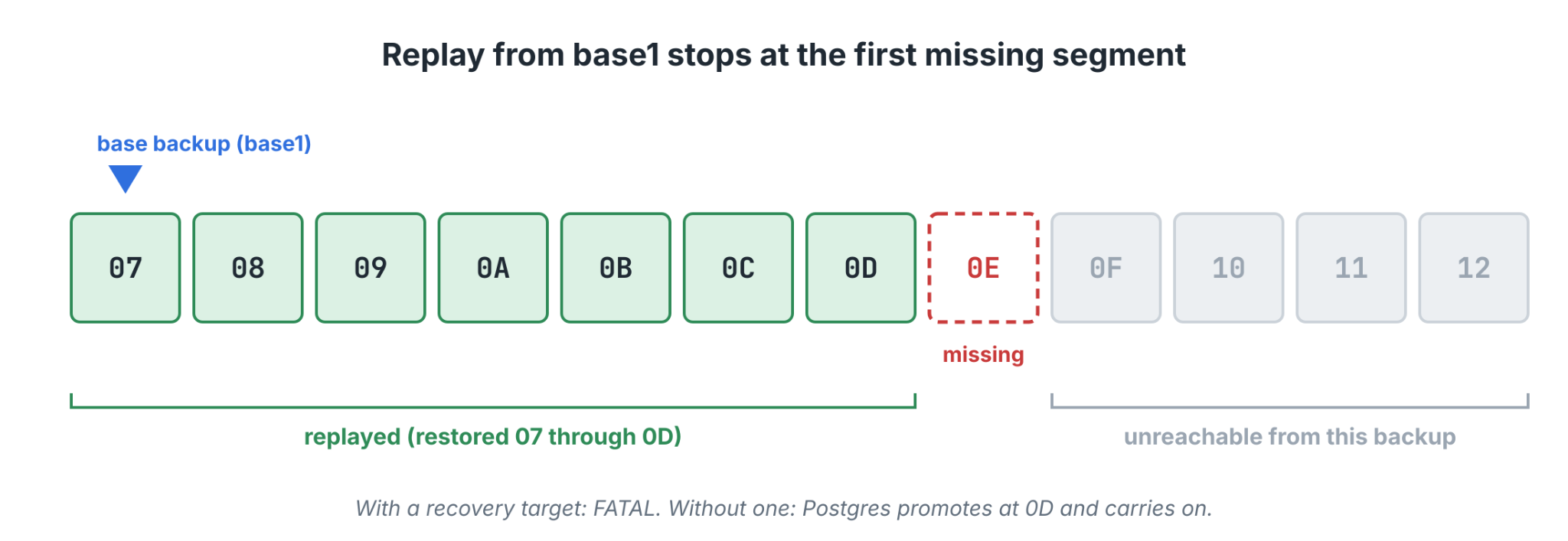 To demonstrate this, I went back to the lab and moved archived segment
 00000001000000000000000E, the page holding batch 3, out of the archive. Then I attempted to restore the first backup with a target of after_batch_5. The pg_ctl start command cheerfully reported "server started" with exit status 0.
That's... not quite what the logs implied:
$> docker exec -u postgres pg18-wal-lab \
     grep -E -e 'point-in-time|0000000D|0000000E' \
             -e 'redo done|FATAL' \
     /var/lib/postgresql/restore1.log

2026-10-05 21:37:00.591 UTC [356] LOG:  starting point-in-time recovery to "after_batch_5"
2026-10-05 21:37:00.952 UTC [356] LOG:  restored log file "00000001000000000000000D" from archive
cp: cannot stat '/var/lib/postgresql/archive/00000001000000000000000E': No such file or directory
cp: cannot stat '/var/lib/postgresql/archive/00000001000000000000000E': No such file or directory
2026-10-05 21:37:00.983 UTC [356] LOG:  redo done at 0/D0288B0 system usage: CPU: user: 0.05 s, system: 0.11 s, elapsed: 0.38 s
2026-10-05 21:37:00.983 UTC [356] FATAL:  recovery ended before configured recovery target was reached
Replay restored WAL segments 07 through 0D, asked for 0E, and got nothing. Postgres started and ran, but didn't recover to the exact point I specified due to missing WAL data. That's something we can see in the logs as a FATAL error. But what if I hadn't specified a target? Then the logs say this:
$> docker exec -u postgres pg18-wal-lab \
     grep -E -e 'backup recovery|0000000D|0000000E' \
             -e 'recovery complete|timeline|redo done' \
             -e 'ERROR|FATAL' \
     /var/lib/postgresql/restore2.log

2026-10-05 21:37:17.037 UTC [413] LOG:  starting backup recovery with redo LSN 0/7000028, checkpoint LSN 0/7000080, on timeline ID 1
2026-10-05 21:37:17.116 UTC [413] LOG:  completed backup recovery with redo LSN 0/7000028 and end LSN 0/7000120
2026-10-05 21:37:17.416 UTC [413] LOG:  restored log file "00000001000000000000000D" from archive
cp: cannot stat '/var/lib/postgresql/archive/00000001000000000000000E': No such file or directory
cp: cannot stat '/var/lib/postgresql/archive/00000001000000000000000E': No such file or directory
2026-10-05 21:37:17.447 UTC [413] LOG:  redo done at 0/D0288B0 system usage: CPU: user: 0.06 s, system: 0.09 s, elapsed: 0.36 s
2026-10-05 21:37:17.468 UTC [413] LOG:  restored log file "00000001000000000000000D" from archive
2026-10-05 21:37:17.501 UTC [413] LOG:  selected new timeline ID: 2
2026-10-05 21:37:17.538 UTC [413] LOG:  archive recovery complete
Without a recovery target, Postgres simply replays until restore_command first fails to find a file. That means a missing segment looks exactly like the end of the archive. With the same hole and no target, the server selected a new timeline (a fresh branch of the ledger), promoted itself, and started accepting writes.
Everything looked normal until I compared the two balances:
$> docker exec -u postgres pg18-wal-lab psql -At -c \
   "SELECT sum(amount) || ' over ' || count(*) || ' entries' FROM ledger;"

-2866.29 over 5001 entries

$> docker exec -u postgres pg18-wal-lab psql -At -p 5434 -c \
   "SELECT sum(amount) || ' over ' || count(*) || ' entries' FROM ledger;"

-5179.92 over 2001 entries
Three thousand entries simply vanished and Postgres was none the wiser. From its perspective, it replayed all available WAL segments. Unfortunately, the gap in the sequence made it impossible to see the problem.
The Panic Button
I made the hole in the previous example by hand. Now imagine what would happen if an enterprising young DBA or unsung volunteer needed to solve an immediate crisis where Postgres is refusing to recycle WAL files. Perhaps the archive command was transmitting files to another system via scp and the target refused authentication. Maybe it was a command to stash archived segments in an S3 bucket that vanished or was unreachable.
Any of these would cause the pg_wal folder to grow forever, because:
It is important that the archive command return zero exit status if and only if it succeeds. Upon getting a zero result, PostgreSQL will assume that the file has been successfully archived, and will remove or recycle it. However, a nonzero status tells PostgreSQL that the file was not archived; it will try again periodically until it succeeds.
It's common to recommend setting archive_command to /bin/true because that command always succeeds. The archive_mode parameter requires a server restart to modify, so a shortcut is simply to enable archive mode, but set it to /bin/true so we can use a different archive command later without restarting the server.
Knowing this, or reading it in documentation or a blog somewhere, it might be tempting to change the archive command to /bin/true to flush out all the backlogged WAL segments since they can't be properly archived. It's a neat trick, but:
Setting archive_command to a command that does nothing but return true, e.g., /bin/true (REM on Windows), effectively disables archiving, but also breaks the chain of WAL files needed for archive recovery, so it should only be used in unusual circumstances.
Those WAL segments that were supposed to go to the archive? Yeah, those are lost forever. We now have a gap that's tens, thousands, or even millions of transactions long. Any backup we recover will simply be unable to replay to anywhere in that zone of lost segments.
Failed archive commands are a signal to fix the archive target, not discard the WAL segments. Even if that means changing the command to cp %p /emergency/mount/path/%f to move the files elsewhere until the real archive location can be addressed. Never, under any circumstances, delete or discard WAL segments if there's literally any way to avoid it. Instead:
Monitor pg_stat_archiver. This query covers the essentials:
SELECT failed_count,
       last_failed_time > last_archived_time AS failing_now,
       now() - last_archived_time AS since_last_success,
       (SELECT count(*) FROM pg_ls_archive_statusdir()
         WHERE name LIKE '%.ready') AS segments_waiting
  FROM pg_stat_archiver;
Alert on the age of
last_archived_timeas well asfailed_count, and watch the server log.Leave headroom on the
pg_walvolume. Themax_wal_sizesetting is a target, not a limit. Keep a monitor on thepg_walmount itself, and set an alert at a reasonable level like 80%.Fix the destination. The waiting segments then drain in seconds, with no gap.
Move segments to a temporary location. An emergency mount. A hastily allocated S3 bucket. A spare server. Try to do anything to preserve these if you value the integrity of the ledger.
Replication slots can also cause Postgres to hoard WAL segments, as I covered in The Folder That Ate the Publisher. But that cause is related to keeping replicas up to date rather than backup integrity. In the context of backups, WAL segments are the lifeblood of any disaster recovery, so need special attention.
But does that mean we need to retain them forever? When is it safe to finally break the chain of custody?
Letting Go
The decision to permanently discard WAL segments belongs to the backup management system, whatever it may be. WAL files are an unbroken chain between each backup. When expiring a backup, that also means it's safe to remove any WAL files leading to the next—there's nowhere to apply them.
The Postgres PITR docs cover this too, with one important caveat:
Once you have safely archived the file system backup and the WAL segment files used during the backup (as specified in the backup history file), all archived WAL segments with names numerically less are no longer needed to recover the file system backup and can be deleted. However, you should consider keeping several backup sets to be absolutely certain that you can recover your data.
The two most common backup management suites for Postgres are:
Each of these have configuration parameters for defining retention policies. This may be the amount of full or incremental backups specifically, or a range of dates the backups must cover. In either case, the maintenance system of the backup tool will automatically purge old backups and the related WAL files on your behalf.
Not even banks keep old ledgers forever. Eventually, the older entries get sent off into cold storage or purged outright.
Settling the Account
This article started with a simple concept of a bank ledger and compared it to how Postgres maintains its own records. In a way, one could view the current state of the database as a cache of the WAL segments. It would be madness to repeatedly replay the ledger of every table to obtain the current value for a row, but we could.
In theory, it would be entirely possible to start with the earliest backup in our history and simply apply WAL segments until the current day. You could do the same thing with your bank account. But nobody does that. We check the balance as of last month, for example, and examine line items since then. That's Postgres in a nutshell: last week's balance (backup) and the line-items (WAL segments) until today.
So take care of your WAL files; they're as precious as your bank balance!