How to Build a RAG Server on pgEdge Cloud via the API
This blog is going to show you how to set up your own RAG Server on pgEdge Cloud. The Cloud UI makes this so easy it is almost insulting - a few clicks and you are done - so I am going to show you the harder and more interesting path instead: the Cloud API. Everything below is a real curl call you can adapt. Replace anything in <angle-brackets> with your own values, and keep your API keys out of your shell history.
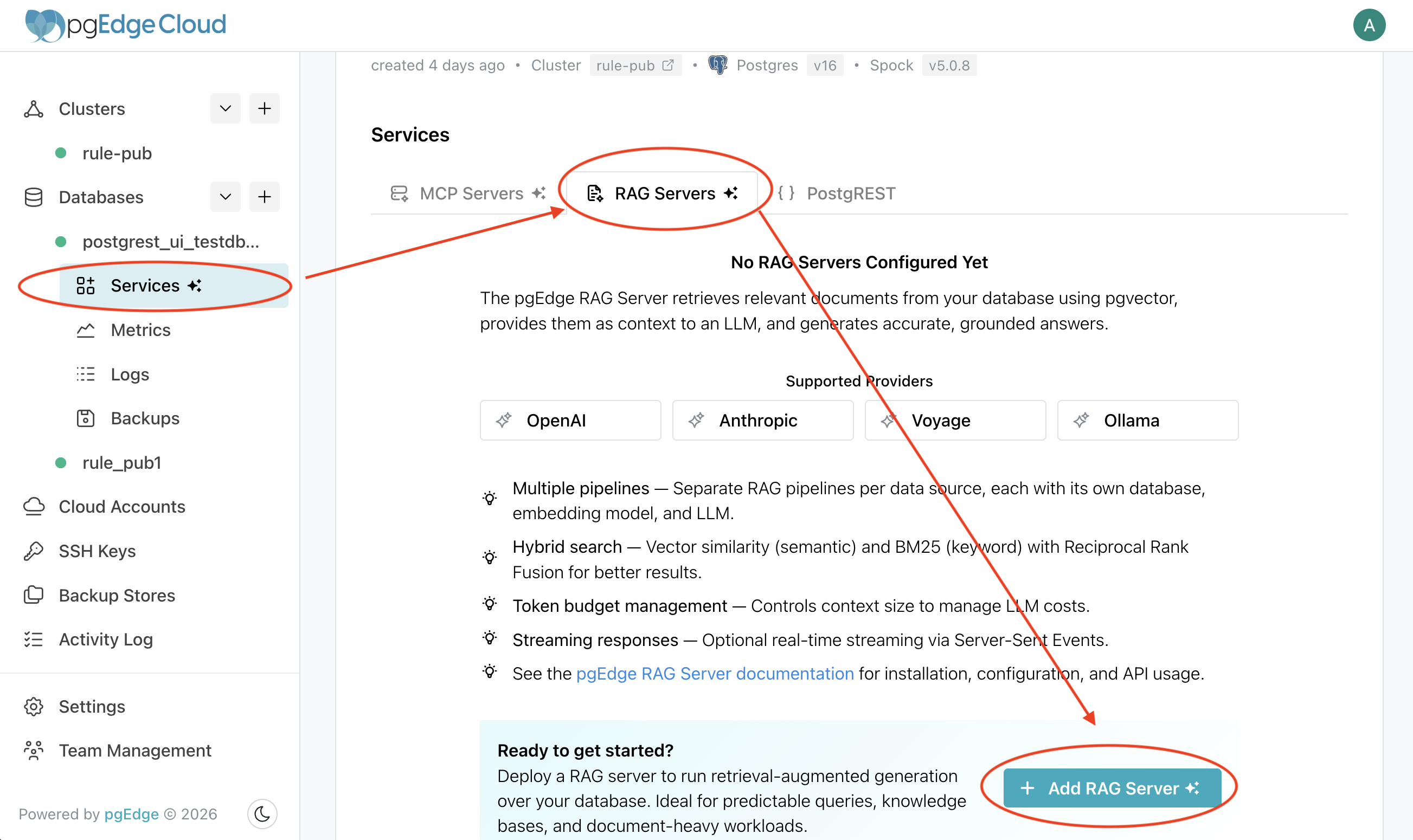
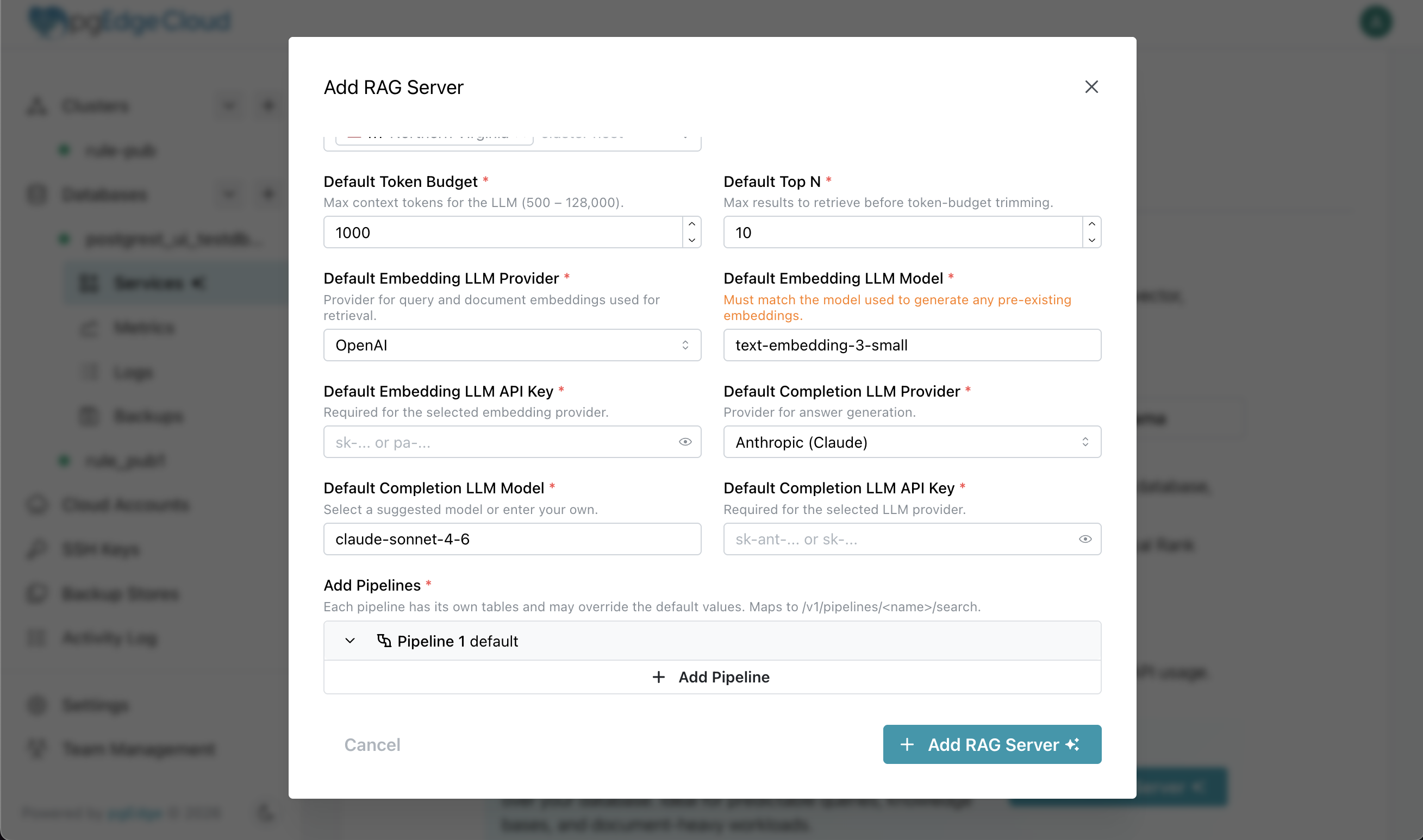
Here's you you do it in the Console GUI:
Click on "Services" under your database, click on "Add RAG Server" and enter your config. see? sooo easy. Soooo boring. Lets use the API.
 First things first: I need a dataset. Because this is my blog, I get to choose the use-case, so I am inflicting my personal interests on you. I am a huge Tabletop RPG nerd (yes, like Dungeons & Dragons), and my favourite system is GURPS 4th Edition (Generic Universal Roleplaying System) by Steve Jackson Games (No, you don’t have to care about this). Although mechanically simple, this is a huge sprawling game system that just grows and grows, because it is generic and universal. You can run a game in any setting or genre, so the amount of content that is available has become massive. I have around 50 books… thankfully in electronic format.
Finding the right rule at the table during play can sometimes be quite an exercise, let alone adding up all the modifiers, and applying the rule. So I did what any reasonable person with a distributed Postgres habit would do. I crammed all fifty books into my own personal RAG server, so I can ask it a plain-English question and get a cited answer back in seconds. Then when I and my degenerate friends gather every Sunday, away from the wives, clutching our beer, dice, pencils, and pizza, I can impose rapid smack-downs upon the Rules Lawyers who try to argue with me.
Anyway… enough about my sample use-case, let's get into it.
Step 1: Get your content into Postgres
This step depends entirely on your own data, so treat it as a sketch. The goal is simple: get your text into a Postgres table, and let the database chunk it and embed it for you. (My source was about fifty GURPS rulebooks as PDFs. PDF is a hate crime against text, so I will spare you the conversion war stories.)
Use the pgEdge image, so the vector stack is already there
Run the pgEdge Enterprise Postgres container locally and the whole embedding stack is already inside it: pgvector for vector similarity, pgedge-vectorizer for automatic chunking and embedding, vchord_bm25 and pg_tokenizer for keyword ranking, and pg_cron for scheduling. No CREATE EXTENSION archaeology, no matching a pgvector build to your Postgres version. The same image runs from laptop to production.
The part of the Compose file that matters is the pgedge-vectorizer config:
services:
  postgres:
    image: ghcr.io/pgedge/pgedge-postgres:18-spock5-standard
    environment:
      - POSTGRES_USER=admin
      - POSTGRES_PASSWORD=${POSTGRES_PASSWORD}
      - POSTGRES_DB=<your-db>
    command: >
      postgres
      -c shared_preload_libraries=pg_cron,pg_tokenizer,pgedge_vectorizer
      -c cron.database_name=<your-db>
      -c pgedge_vectorizer.provider='voyage'
      -c pgedge_vectorizer.api_url='https://api.voyageai.com/v1'
      -c pgedge_vectorizer.api_key_file='/run/secrets/voyage_api_key'
      -c pgedge_vectorizer.model='voyage-3'
      -c pgedge_vectorizer.databases='<your-db>'
      -c pgedge_vectorizer.batch_size=20
      -c pgedge_vectorizer.num_workers=2
    ports:
      - "5432:5432"
The extensions are preloaded at start because they run background workers. After that, the pgedge_vectorizer.* settings are the whole configuration:
pick a
provider(it speaks OpenAI, Voyage AI, or a local Ollama, so swapping is a one-line change)pick a
model(herevoyage-3, which produces the 1024-dimension vectors your embedding column is sized for)point
api_key_fileat a mounted secret so the key never lands indocker inspect, and setbatch_sizeandnum_workersfor throughput.
That is the whole setup.
Let pgedge-vectorizer do the chunking and embedding
This is the part where you stop doing work. You insert rows of text into your table, and pgedge-vectorizer does the rest - inside the database, on a trigger-based architecture. A trigger notices the new rows. The chunking module splits each one into optimally-sized chunks in a companion <your-table>_chunks table. Background workers then pull chunks off an internal queue (SKIP LOCKED for safe concurrency), batch them, call your provider to embed them, and write the vectors back into the embedding column. Failed calls retry on their own with exponential backoff, and the whole thing runs asynchronously, so loading never blocks waiting on an embedding API.
You configure it once and watch the queue drain with a single query:
SELECT * FROM pgedge_vectorizer.vectorizer_status;When it hits zero, every chunk has an embedding and the HNSW index is populated. No embedding script, no glue code, no worker process of your own to babysit.
Export it for the move to Cloud
I used pg_dump to export the finished database in PostgreSQL's custom format, which restores fast over the network and carries the embeddings along with the content data:
pg_dump -Fc --no-owner --no-acl -f data.dumpStep 2: Put the database on pgEdge Cloud
Now we leave the laptop and go to pgEdge Cloud. The UI does all of this in a few clicks, but the API is more fun and more repeatable, so here it is end to end.
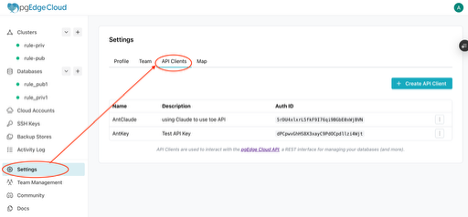 Create an API client in the Cloud console (account settings) to get a client ID and secret, then exchange them for a 24-hour bearer token:
export TOKEN=$(curl -s -X POST 'https://api.pgedge.com/oauth/token' \
  -H 'Content-Type: application/json' \
  -d "{\"client_id\": \"${PGEDGE_CLIENT_ID}\", \
       \"client_secret\": \"${PGEDGE_CLIENT_SECRET}\"}" \
  | jq -r '.access_token')
Every call after this carries Authorization: Bearer ${TOKEN}.
Create a single-node cluster
For the purposes of this walkthrough, I don't need a distributed multi-master cluster. A single r7g.medium node is plenty, and the same database can grow into a multi-region deployment later without a re-platform if I ever want it.
The one real decision is public or private. Public puts the database behind a TLS endpoint, which is simplest and fine for a read-only knowledgebase. Private keeps it off the public internet and reaches it through a tunnel, which is the right call for anything sensitive. Here is a public cluster:
curl -s -X POST "https://api.pgedge.com/v1/clusters" \
  -H "Authorization: Bearer ${TOKEN}" \
  -H "Content-Type: application/json" \
  -d '{
    "name": "<your-cluster>",
    "cloud_account_id": "<your-cloud-account-id>",
    "backup_store_ids": ["<your-backup-store-id>"],
    "regions": ["us-east-1"],
    "node_location": "public",
    "nodes": [{
      "name": "n1",
      "region": "us-east-1",
      "instance_type": "r7g.medium",
      "volume_size": 30
    }],
    "networks": [{
      "region": "us-east-1",
      "cidr": "10.1.0.0/16",
      "public_subnets": ["10.1.1.0/24"]
    }],
    "firewall_rules": [
      {"name": "postgres", "port": 5432, "sources": ["0.0.0.0/0"]},
      {"name": "https", "port": 443, "sources": ["0.0.0.0/0"]}
    ]
  }'
That https rule on port 443 is what makes your RAG endpoint reachable later.
A private cluster differs in three places. First, set the node location to private:
"node_location": "private",Second, give the network a private subnet alongside the public one:
"networks": [{
  "region": "us-east-1",
  "cidr": "10.1.0.0/16",
  "public_subnets": ["10.1.1.0/24"],
  "private_subnets": ["10.1.128.0/24"]
}],
Third, drop the https rule. A private cluster has no public endpoint to terminate TLS on, so the firewall only needs Postgres. Its services are reached through an ingress instead, which we set up in Step 3:
"firewall_rules": [
  {"name": "postgres", "port": 5432, "sources": ["0.0.0.0/0"]}
],
Each create returns an id and status: "creating". Poll until it reads available:
curl -s "https://api.pgedge.com/v1/clusters/<cluster-id>" \
  -H "Authorization: Bearer ${TOKEN}" | jq -r '.status'
Create the database
The API auto-configures pgBackRest backups against your backup store:
curl -s -X POST "https://api.pgedge.com/v1/databases" \
  -H "Authorization: Bearer ${TOKEN}" \
  -H "Content-Type: application/json" \
  -d "{
    \"name\": \"${DB_NAME}\",
    \"cluster_id\": \"${CLUSTER_ID}\",
    \"backups\": {
      \"provider\": \"pgbackrest\",
      \"schedules\": [{
        \"type\": \"full\",
        \"cron_expression\": \"0 0 * * 0\",
        \"id\": \"weekly-full\"
      }]
    }
  }"
The response returns host, port, username, and password. Poll until available.
Restore the dump
The custom-format dump from Step 1 already holds the extensions, schema, indexes, and data, so a single pg_restore rebuilds the whole database in one shot.
On a public cluster, connect straight to the host:
pg_restore -h "${DB_HOST}" -p 5432 -U admin -d "${DB_NAME}" \ --no-owner --no-privileges \ data.dumpOn a private cluster, (assuming you are using AWS) open an SSM port-forward tunnel to the node and restore through it, using hostaddr to keep the real hostname for routing while connecting to localhost:
aws ssm start-session \
  --target "${INSTANCE_ID}" \
  --document-name AWS-StartPortForwardingSessionToRemoteHost \
  --parameters '{"host":["'"${PRIVATE_IP}"'"],
    "portNumber":["5432"],"localPortNumber":["15432"]}'
pg_restore -h "${DB_HOST}" -p 15432 -U admin -d "${DB_NAME}" \ --no-owner --no-privileges \ data.dumpYour embeddings rode along inside the dump, so there is nothing to regenerate on Cloud. The database is ready.
Step 3: Deploy the RAG server
On pgEdge Cloud, a RAG server is not a separate box you stand up next to your database. It is a service you attach to the database itself with a single PATCH, pointing it at the table you already loaded.
Because the server runs right next to your data, retrieval is local. A query comes in, the server embeds it, runs hybrid search across your vectors and your keyword index, fuses and trims the top chunks to a token budget, and only then calls your completion model to write the answer. You describe all of that as a named pipeline, and that name becomes a URL you can hit. One database can host several pipelines, each aimed at different tables or tuned differently. You bring the data and the query. The server handles everything in between.
The RAG service call
curl -s -X PATCH \
  "https://api.pgedge.com/v1/databases/${DATABASE_ID}" \
  -H "Authorization: Bearer ${TOKEN}" \
  -H "Content-Type: application/json" \
  -d "{
    \"services\": [{
      \"service_type\": \"rag\",
      \"rag_config\": {
        \"embedding_llm\": {
          \"provider\": \"voyage\",
          \"model\": \"voyage-3\",
          \"api_key\": \"${VOYAGE_API_KEY}\"
        },
        \"completion_llm\": {
          \"provider\": \"anthropic\",
          \"model\": \"claude-sonnet-4-6\",
          \"api_key\": \"${ANTHROPIC_API_KEY}\"
        },
        \"pipelines\": [{
          \"name\": \"gurps-rules\",
          \"description\": \"GURPS 4th Edition rules lookup across all sourcebooks\",
          \"system_prompt\": \"You are a GURPS 4th Edition rules expert. Answer questions using only the provided context from official GURPS sourcebooks. Always cite the book and page reference (e.g., B371, HT45, MA120) when referencing a rule. If the context does not contain enough information to answer, say so clearly.\",
          \"tables\": [{
            \"table\": \"<your-table>_chunks\",
            \"text_column\": \"content\",
            \"vector_column\": \"embedding\"
          }],
          \"hybrid_enabled\": true,
          \"vector_weight\": 0.5,
          \"token_budget\": 6000,
          \"top_n\": 25
        }]
      }
    }]
  }"
The embedding_llm has to match what you embedded with. I built the vectors with Voyage voyage-3, so the RAG server queries with Voyage voyage-3. Mismatch the embedding model and your similarity search is comparing apples to a different model's idea of apples. This is the LLM that will take your prompt and vectorise it for similarity search against your content.
The completion_llm is the model that writes the final answer from the retrieved context. I am using Anthropic's Claude Sonnet 4.6. As the completion LLM, it has no usage during the original query or the embeddings and similarity search. It's purely for making a "nice" answer out of the results.
The pipelines array is the heart of it. Each pipeline names the table, text column, and vector column to search, carries a system prompt that sets the answer's behaviour, and tunes retrieval:
hybrid_enabled:trueruns vector similarity (pgvector) and BM25 keyword search (vchord_bm25) together, then fuses the results. This is where that second extension from Step 1 pays off. Pure vector search is great at meaning and weak at exact terms like "B374" or "Rapid Strike." Hybrid catches both.vector_weight:0.5splits the influence evenly between the vector and keyword sides of that hybrid search. Even weighting helps short, keyword-dense definitions surface alongside longer prose.token_budget:6000caps how much retrieved context gets handed to the completion model, which keeps cost and latency predictable.top_n:25is how many chunks the retriever pulls before the budget trims them down. A wider net means the right chunk is more likely to be in the pile, but is also slower
The PATCH puts the database into modifying while the RAG container starts. Poll until the database is available again and the service state reads running:
curl -s "https://api.pgedge.com/v1/databases/${DATABASE_ID}" \
  -H "Authorization: Bearer ${TOKEN}" \
  | jq '{status, services: [.services[]
      | {service_id, service_type, state, public_domain}]}'
Reaching the endpoint
On a public cluster, the service comes up with its own public domain along the lines of rag-<service-id>.<cluster-slug>.a1.pgedge.io, and HTTPS on port 443 routes straight to it (that is what the extra firewall rule was for). You can call it immediately.
On a private cluster, the service has no public address by design. You register it on an ingress, which is backed by a network load balancer, and the ingress gives you an external URL such as https://rag.<cluster-slug>.a1.pgedge.io. From the caller's point of view the endpoint behaves the same, it is just reached through the ingress rather than directly.
Ask it something
The pipeline name is the path on the endpoint. Post a query as JSON:
curl -s -X POST \
  "https://${RAG_DOMAIN}/v1/pipelines/gurps-rules" \
  -H "Content-Type: application/json" \
  -d '{"query": "What is the cost of the Danger Sense advantage?"}'
Back comes a clean answer:
Based on the provided context, Danger Sense costs 15 points (B47, as referenced in the trait description shown in Documents 2 and 10).
 It also has one Special Limitation available:
 - ESP (-10%): Your ability is part of the ESP psi power, which would reduce the cost to 14 points.
The pipeline ran the retrieval across all fifty books, fused the hybrid results, and handed Claude exactly the right chunks to answer from.
That is the whole build. A single-node cluster, a database, and a RAG service attached with one PATCH, now answering questions about a pile of PDFs that used to live uselessly on a hard drive.
Step 4: Profit … or at least peace at the table
The point of all this was never the architecture. It was Sunday night, four hungry players, and a rules dispute about to derail the session. So let me show you what victory actually looks like, in ascending order of absurdity.
The warm-up. A new player wants Danger Sense and asks what it costs. In the old days I would have flipped to the Basic Set, scanned the advantages list, and hoped nobody noticed me stalling. Now I type the question and get "15 points, B47" before he has finished writing his name on the character sheet. Next.
The real fight. Two sessions later, my swashbuckler wants to attack twice in one turn with his rapier, because of course he does. Rapid Strike. Someone at the table insists it is a flat penalty, someone else swears Weapon Master changes it, and the pizza is congealing. I ask the server. It comes back with the minus-6 penalty to each attack from B374, notes that Weapon Master halves that penalty, and throws in the cinematic extensions from Martial Arts on MA128 for good measure. The argument is over in the time it took to read this sentence.
The ludicrous finale. It is the climax of the campaign. The monk has been knocked off a balcony, is on fire, and wants to grapple the cultist falling next to him while they both plummet toward the altar, in near-total darkness, as an All-Out Attack. The table goes quiet. Every one of those words is a different rule in a different book.
So I ask the only question that matters: "What are all the modifiers for grappling an opponent in total darkness while falling, as an All-Out Attack?" And the server, bless its hybrid-search heart, walks the whole mess. The darkness penalty. The grappling mechanics from Martial Arts. The All-Out Attack tradeoff, more damage for no defence, which feels thematically perfect for a man who is already on fire. The falling-damage formula from B431 for when this inevitably goes wrong. Cross-book citations, one coherent answer, ten seconds.
We resolved it. The monk made the grab, took the fall, and the cultist broke his fall in the most literal sense. Nobody reached for a book once.
Where to go from here
If you want to build your own, you do not need fifty roleplaying game books and a grudge against rules lawyers. You need a table of text with a vector column, a Voyage or OpenAI key to embed it, a completion model to answer from it, and the handful of API calls above. Spin up a single-node cluster, load your data, attach a RAG service, and start asking questions.
Point it at your support docs, your internal wiki, your API reference, or, yes, your tabletop rules. The pipeline does not care what the content is. It only cares that you finally put it somewhere a question can reach it.
Now if you will excuse me, it is nearly Sunday, and the beer is not going to drink itself.

