Using Patroni to Build a Highly Available Postgres Cluster—Part 3: HAProxy
Welcome to Part three of our series for building a High Availability Postgres cluster using Patroni! Part one focused entirely on establishing the DCS using etcd to provide the critical DCS backbone for the cluster, and part two added Patroni and Postgres to the software stack. While it's entirely possible to stop at that point and use the cluster as-is, there's one more piece that will make it far more functional overall.
New connections need a way to reach the primary node easily and consistently. Patroni provides a REST interface for interrogating each node for its status, making it a perfect match for any software or load-balancer layer compatible with HTTP checks. Part three focuses on adding HAProxy to fill that role, completing the cluster with a routing layer.
Hopefully you still have the three VMs where you installed etcd, Postgres, and Patroni. We will need those VMs for the final stage, so if you haven't already gone through the steps in part one and two, come back when you're ready.
Otherwise, let's complete the cluster!
What HAProxy adds
HAProxy is one of the most common HTTP proxies available, but it also has a hidden superpower: it can transparently redirect raw TCP connections as well. This means it can also act as a proxy for any kind of service such as Postgres. Here's how it works:
HAProxy connects to the Patroni REST interface and gets the status for the "/" URL.
Patroni will only respond with a "200 OK" status on the primary node. All other nodes will produce a "500" error of some kind.
HAProxy marks nodes that respond with errors as unhealthy.
All connections get routed to the only "healthy" node: the primary for the cluster.
Of course that's not the end of it; the Patroni REST API is incredibly powerful, as it provides multiple additional endpoints. For example a check against:
/replica will succeed if the node is a healthy streaming replica of the primary, a good match for offloading intensive read queries from the primary node.
/read-only works on any healthy node in the cluster—perfect for connections that don't care how they interact with the database.
/synchronous only succeeds on healthy synchronous streaming replicas, for operations where it's important for read durability.
There's also an HTTP parameter (lag) that limits success on replicas to a specified maximum. Want to target only replicas with less than 1MB of replication latency? Simply add that parameter to the HTTP check operation in HAProxy. This enables creation of multiple proxy definitions for each dedicated requirement, and HAProxy maintains everything automatically based on Patroni status codes—no manual intervention necessary.
Installing HAProxy
Thankfully installing HAProxy is pretty easy because it's so ubiquitous. It should be available in the default repositories of every major Linux platform without any special steps. In the case of Debian, one command should do it:
sudo apt install -y haproxyBuilding a useful HAProxy configuration
Unlike Patroni, configuring HAProxy is a much simpler affair. The default haproxy.cfg configuration file should already exist in the /etc/haproxy directory following installation. Since the defaults depend entirely on the version of HAProxy and the target distribution, let's replace it with something that should work everywhere and specific to the Patroni cluster being built.
Begin with the preamble of all the service defaults. There are globally applied settings to all defined listeners, and default values for standard operation. For example:
global
    maxconn 100

defaults
    log global
    mode tcp
    retries 2
    timeout client 30m
    timeout connect 4s
    timeout server 30m
    timeout check 5s
In this case, HAProxy will stop allowing connections after 100—a perfect amount for a demo cluster, but you may want to increase it in a production system.
The remainder of parameters define log output, set the connection type to TCP rather than HTTP, ensure checks are repeated twice to prevent false positives, and establish a few basic timeouts to avoid stale connections or server states.
The next step is to define a listen block. This is what actually binds a port to a group of servers and defines the health check against Patroni's REST API. Based on the VMs we've built so far, it should look something like this:
listen pg-cluster
    bind *:6543
    mode tcp
    option httpchk
    http-check expect status 200
    default-server inter 3s fall 3 rise 2 on-marked-down shutdown-sessions

    server postgres1 pg1:5432 check port 8008
    server postgres2 pg2:5432 check port 8008
    server postgres3 pg3:5432 check port 8008
The Postgres service port of 5432 is already in use in the VMs we created, so the proxy must use a different port. It's probably not necessary to explicitly set the mode to TCP again in the listen block, but is a good practice just in case. Checks can be either TCP or HTTP, and despite the fact connections should be TCP in nature, the health check itself is HTTP thanks to Patroni's convenient REST interface. And of course we only want to acknowledge a 200 status as success.
The "default-server"line has a special importance here. Translated, it means:
Perform the health check every three seconds.
Require three failures before marking the host as down.
Set a failed host as healthy after two successful checks.
When a node is marked down, disconnect any established sessions.
This is necessary because HAProxy has many operation modes, many of which are permissive or otherwise optimistic. Just because new connections shouldn't be sent to a new server doesn't mean old ones are suddenly invalid. In the case of Patroni however, it means exactly that!
If Patroni fails, the REST interface also disappears, and HAProxy will interpret that as a node failure. But in the event Patroni fails before it can properly stop Postgres, Postgres will remain online, possibly accepting writes in the case of a primary node. We need to terminate all connections just in case to prevent split-brain scenarios.
This is one situation where simply relying on Postgres connection protocol parameters like target_session_attrs reveals an underlying weakness. That parameter only ensures connections reach a writable node when set to read-write, it does not guarantee that only one node in the specified list of hosts is writable! If two nodes are promoted to read-write status, that's simply too bad, and cleaning up afterwards is up to you.
Every safeguard matters, and so the safest course of action is to immediately terminate connections to hosts that fail three consecutive health checks.
The next block simply consists of one line for each server, including the port to direct connections to, and the check port itself. Now connections to port 6543 on this server will be redirected to port 5432 on whichever node is the current primary. By running HAProxy on each VM, connections to any node will go to the primary without any additional configuration.
Starting and testing HAProxy
Once the configuration file is complete, start HAProxy to activate the new routing layer:
sudo systemctl enable haproxy
sudo systemctl start haproxy
That's really all there is to it. But we also want to test the proxy to verify that it's working as expected. The easiest way to do that is to connect from any node aside from the primary and then check to see where the connection went.
Use patronictl to find the current primary:
patronictl -c /etc/patroni/18-demo.yml list

+ Cluster: 18-demo (7606465692216410488) -+-----------+----+-------------+-----+------------+-----+
| Member         | Host         | Role    | State     | TL | Receive LSN | Lag | Replay LSN | Lag |
+----------------+--------------+---------+-----------+----+-------------+-----+------------+-----+
| patroni-demo-1 | 192.168.6.10 | Leader  | running   |  2 |             |     |            |     |
| patroni-demo-2 | 192.168.6.11 | Replica | streaming |  2 |   0/4001C38 |   0 |  0/4001C38 |   0 |
| patroni-demo-3 | 192.168.6.12 | Replica | streaming |  2 |   0/4001C38 |   0 |  0/4001C38 |   0 |
+----------------+--------------+---------+-----------+----+-------------+-----+------------+-----+
This output indicates node 1 is still the cluster primary. In that case, connect from node 2 or 3 on the proxy port and check the server IP address:
psql -h pg3 -p 6543 -U postgres -c "SELECT inet_server_addr();" postgres

 inet_server_addr
------------------
 192.168.6.10
That's definitely node 1. Success!
Adding endpoints
Remember how we mentioned the ability to add additional endpoints? Here's an example where connections will only go to replicas with less than 1MB of replication latency:
listen pg-cluster-ro
    bind *:6544
    mode tcp
    option httpchk /replica?lag=1MB
    http-check expect status 200
    default-server inter 3s fall 3 rise 2 on-marked-down shutdown-sessions

    server postgres1 pg1:5432 check port 8008
    server postgres2 pg2:5432 check port 8008
    server postgres3 pg3:5432 check port 8008
After restarting HAProxy, it will also listen on port 6544 and only send connections to one of the replicas. These servers are idle, so there should be no lag, allowing us to test the connection this way:
psql -h pg1 -p 6544 -U postgres -c "SELECT inet_server_addr();" postgres

 inet_server_addr
------------------
 192.168.6.11
Go ahead and execute that command as many times as you want, it will never execute on node 1. How's that for convenience?
Finishing up
We've now completed the proverbial "HAProxy and DCS sandwich" Postgres cluster, made possible by Patroni. Here it is, in all of its glory:
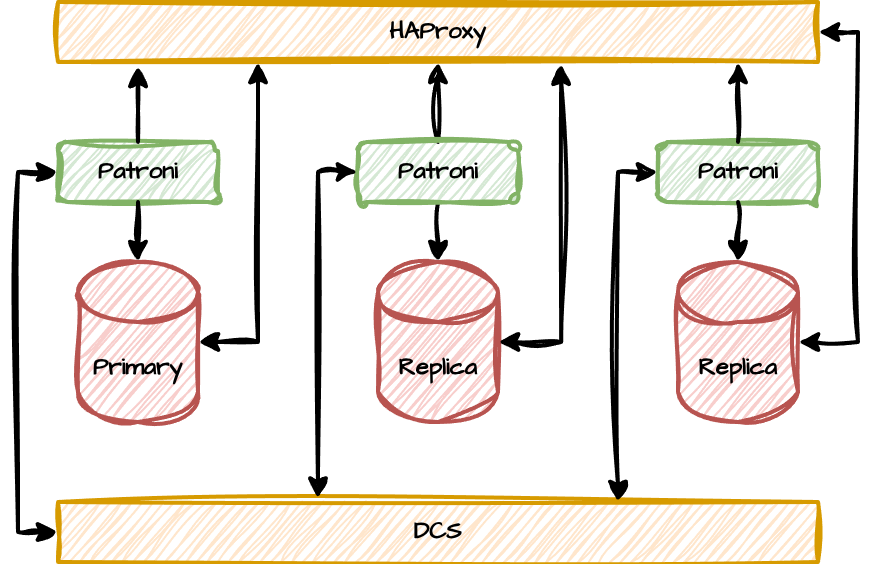 Both HAproxy and etcd (the DCS) are running on the same nodes as Postgres and Patroni for the purposes of this demonstration, but this is hardly a standard configuration. We only did it this way to simplify the example and require a minimum of virtual machines. A more typical cluster is more likely to decouple the HAProxy layer to a separate system, allowing it to act as a dedicated endpoint. It's usually easier to connect to "postgres-proxy.company.net" than arbitrarily assign Postgres VMs to various applications, or use multi-host connection strings. Putting HAProxy on its own host also allows it to revert to the default 5432 Postgres port and simply masquerade as Postgres.
Another interesting variant includes running HAProxy at the application layer itself. Applications connect to the local server or server group and transparently route to the current Postgres primary based on HAProxy checks.
The DCS (etcd here) is also likely to exist on a separate set of hosts. This allows multiple Patroni clusters to share the same consensus layer, and having a separate DCS layer makes two-node Postgres clusters a valid solution. For clusters that need to conserve storage or compute, reducing excess Postgres deployments is a great way to go. Larger or more established organizations may already have a consensus system (such as ZooKeeper or Consul) in place, so it makes sense to reuse these resources.
Regardless of what your deployment model resembles, Patroni acts as the glue binding everything together: all Postgres nodes, the DCS, and the routing system. Everything acts as a single coherent cluster, perhaps in spite of how each component may act in isolation. In the end, you'll have the best HA solution available for Postgres short of a full Kubernetes solution, but in a much simpler package.
We at pgEdge use Patroni in our own clusters, and now you know why. Let us know if you found this series useful, educational, or at least entertaining. Power to Postgres!

